
Connect Modulus to your AI
Enhance your AI development with access to specialized fintech skills, development guidance, source code, review protocols, ongoing regulatory compliance, and audit recommendations.
Your AI requests relevant guidance from Modulus and applies it to your project. Modulus never views your code or prompts.
The Modulus MCP Subscription
Build faster and safer with Modulus
AI can generate software quickly. Building financial technology that is ready for production, regulatory scrutiny, and the market requires deeper judgment, proven infrastructure, and accountable human expertise.
The Modulus MCP subscription brings three decades of financial-system production experience directly into the AI tools your team uses throughout design, development, testing, and release. Connected AI assistants can use that guidance to choose stronger architecture, identify fragile financial logic, and surface security, resilience, performance, and regulatory risks before they lead to expensive rework, production failures, breaches, or fines. They can also recognize proven patterns, existing components, and simpler approaches that eliminate unnecessary development.
The result is a faster path from concept to production, fewer avoidable mistakes, and clearer decisions about what should be tested, audited, rebuilt, licensed, or independently reviewed before the system handles live money. Every active subscription also includes weekly access to a Modulus engineer, with approved pathways to applicable Modulus patent licenses, the Modulus Partner Program, technical partner references, and promotion to relevant investors in the Modulus network.
Included with every active subscription
Weekly alignment meetings with Modulus engineers
Every active subscription includes one 30-minute alignment meeting with a Modulus engineer each week at no additional charge. Use the session to review architecture, priorities, blockers, testing, risk, licensing questions, and the next decisions your team needs to make.
Build with production intelligence
Give your AI assistant and development team access to financial-system patterns, design guidance, source code, and production lessons that general-purpose coding tools do not provide.
Stronger architecture
Choose patterns suited to live financial operations rather than generic software examples.
Earlier risk identification
Surface weaknesses in transaction logic, security, resilience, performance, and regulated-finance design before they cause expensive rework or production failures.
Human oversight when it matters
Recognize when deeper testing, an audit, independent review, or accountable human oversight should precede release.
Leverage Modulus tech and patents
Move beyond guidance when existing Modulus infrastructure or protected technology can strengthen the product.
Applicable patent licenses
Receive licenses to Modulus patents applicable to an approved product, implementation, or use case.
Avoid unnecessary rebuilding
Identify production-proven Modulus technology that may replace unnecessary custom development and reduce implementation time, cost, and risk.
Clearer build and license decisions
Determine where custom development adds value and where existing infrastructure, licensing, or independent review is the stronger choice.
Bring the product to market with Modulus
Approved subscribers can extend the relationship beyond development through Modulus commercial programs, market positioning, and investor relationships.
Modulus Partner Program
Sell approved products and services through the Modulus Partner Program and pursue relevant opportunities across the Modulus network.
Technical partner positioning
With written approval, reference Modulus as a technical partner in pitch decks, investor materials, proposals, and marketing materials.
Investor network promotion
On request, Modulus will promote approved companies and opportunities to relevant investors in its network.
Partner Program participation, patent licensing, technical partner references, and investor promotion are subject to product fit, separate review, and written approval or agreement. Participation and promotion do not guarantee sales, introductions, or funding.
Your AI builds while Modulus advises
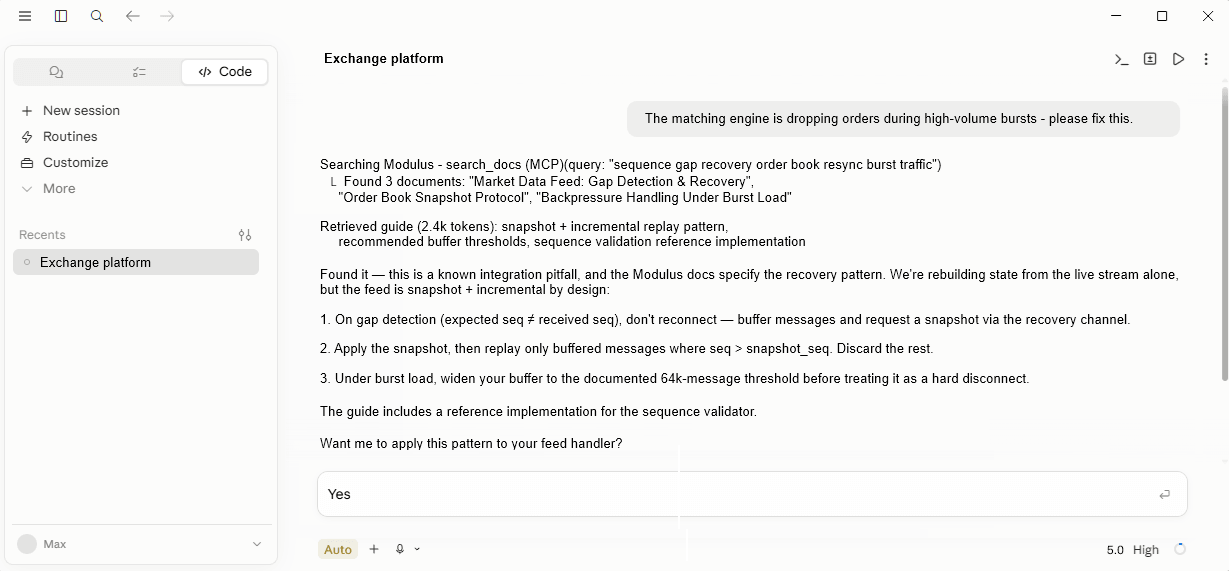
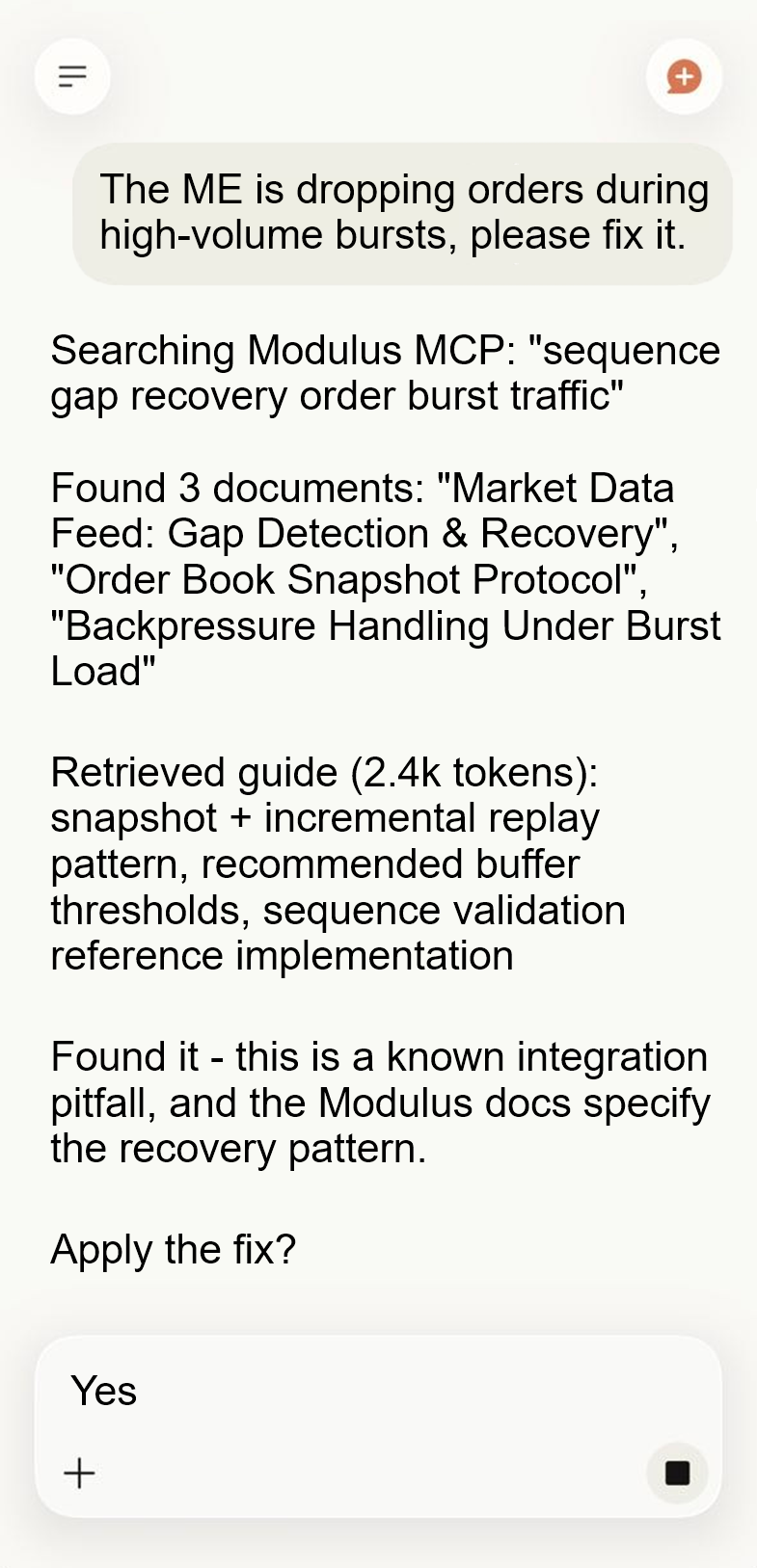
The Modulus MCP Server gives AI systems access to specialized financial technology knowledge, development capabilities, and review protocols that generic AI guidance may overlook. Its guidance draws on three decades of Modulus trade secrets, proprietary engineering methods, production experience, and lessons learned from building exchanges, trading platforms, brokerage systems, and the critical matching, risk, market data, and transaction infrastructure behind them.
AI systems can request source code, architectures, technical specifications, integration plans, implementation guidance, test frameworks, specialized skills, checklists, and review protocols across the financial technology lifecycle. The server can draw from production-proven Modulus code covering charting, technical analysis, backtesting, walk-forward testing, expert advisors, trading systems, trading platforms and applications, banking systems, brokerage systems, spot and futures exchanges, matching engines, risk engines, prediction markets, market-making systems, data feeds, brokerage API integrations, payment gateways, custody platforms, institutional treasury systems, and related financial infrastructure.
Its guidance also covers regulated finance, transaction integrity, execution, custody, payments, reconciliation, KYC and AML, pre-trade and at-trade risk management, post-trade surveillance, security, resilience, performance, and operational controls. These capabilities help AI identify architectural weaknesses, financial-integrity concerns, overlooked failure modes, and areas requiring deeper testing or independent review.
Your code and prompts stay private
The Modulus MCP server is designed as a one-way guidance channel. It returns financial technology skills, checklists, and audit protocols to your AI, but does not request, receive, inspect, or store your source code, repository contents, credentials, logs, customer information, or other proprietary project data. Modulus does not upload your project or run it through a Modulus-hosted language model.
Your AI performs the review within the development environment and model infrastructure you already use. It examines the project, applies the guidance returned by Modulus, and presents its findings directly to you. Neither the project nor the resulting analysis is transmitted to Modulus through the MCP server.
Modulus receives project materials only if you later choose to purchase an Elastic Work Unit and explicitly provide your data through that separate workflow.
Audit throughout the build
Your AI can apply Modulus review protocols throughout development, after material builds, before major releases, and before the system handles live money. Drawing on three decades of experience building financial infrastructure, these protocols guide your AI beyond ordinary code quality to examine financial integrity, transaction handling, architecture, security, performance, resilience, and data protection.
The review process is designed to uncover problems generic AI guidance may miss, including inconsistent balances, fragile transaction states, untested failure paths, hidden dependencies, unsafe assumptions, and production behavior that differs from testing. It also helps identify regulated-finance considerations and determine what testing or independent review may be needed before release.
These reviews are performed by your AI using Modulus guidance, so Modulus does not receive your source code through the Modulus MCP workflow. They are not independent audits, legal advice, compliance determinations, or certifications. When deeper validation or accountable human review is needed, your AI may recommend an Elastic Work Unit for an independent Modulus audit or engineering review.
When your AI suggests an Elastic Work Unit
Your AI may suggest Modulus when independent engineering, testing, or review could materially strengthen the project or reduce risk before release. This may include systems that handle live money or critical financial logic, such as matching and execution, ledgers and reconciliation, risk and margin, brokerage, custody, or market data.
It may also recommend an Elastic Work Unit for low-latency systems, security-sensitive architecture, regulated-finance considerations, unresolved production failures, or any situation where an accountable human engineer should examine the work before it enters production.
The recommendation is advisory only. Your AI should explain what triggered it, what Modulus could contribute, and whether the project would benefit from engineering, remediation, or an independent audit. You remain free to continue with your existing team and tools, engage Modulus, or take no action. Connecting the MCP server never creates a purchase obligation.
Two ways to use Modulus
Let your AI build
Connect the Modulus MCP server. Your AI receives fintech guidance, skills, source code, regulatory compliance guidance and security audits while your project remains inside its existing environment.
Let Modulus build or audit
Use Elastic Work Units when you want a Modulus engineer to build a critical component, investigate a problem, or perform a review. Each Work Unit costs $499 and returns reviewed work within 24 hours.
The Model Context Protocol (MCP)
The Model Context Protocol, or MCP, is an open standard introduced by Anthropic in November 2024 that lets large language models talk to external tools, data, and applications through a single uniform connection, instead of a custom integration for every system. It solves the integration problem that pre-MCP AI faced, where every new model paired with every new data source meant a new connector to build and maintain.
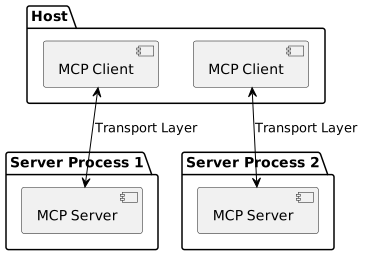
MCP defines three roles: hosts, the AI agents or assistants; clients, the connectors the host uses to reach a server; and servers, the systems that expose tools and data over the protocol. When a model needs information or wants to take an action, the host asks the relevant client, the client calls the server over JSON-RPC, and the result flows back into the conversation. Major providers including OpenAI and Google DeepMind have adopted MCP, alongside Anthropic.
The Modulus MCP server speaks this same standard, so any MCP-capable model can connect to Modulus fintech skills, review protocols, and audit recommendations with the same protocol it already uses for everything else.

Modulus MCP server functionality
Architecture and design guidance, financial data modeling, finance-specific testing doctrine, security guidance, integration playbooks, risk and margin review, performance and resilience doctrine, regulated-finance issue spotting, component discovery, go-live readiness, audit protocols, and more. See how it works, what it covers, and how it keeps your code private.
Connect the Modulus MCP server
The Modulus MCP server connects to compatible AI development environments over the Model Context Protocol. Add it once and your AI can request Modulus fintech skills, review protocols, and audit recommendations on demand.
1. Get your API key
The Modulus MCP server is a monthly subscription of $1,799 per month. No password or conventional Modulus account is required. Fill in the form, complete checkout, and your API key will be emailed to you.
Connecting from Claude on the Web or Claude Desktop? Skip the key entirely: subscribe, then add the connector and authorize in your browser with your subscription email. See Set up your platform below.
The Modulus MCP server never receives your source code, repository contents, logs, credentials, or proprietary project text. It receives only the structured category selections your AI uses to request relevant guidance. Modulus may record those selections, response versions, token activity, and basic operational metadata to operate the service, prevent abuse, and improve the guidance library.
2. Add the server to your AI
The endpoint is https://mcp.modulusglobal.com and it authenticates with your API key as a bearer token. Replace YOUR_API_KEY with the key from your email.
3. Verify the connection
Set up your platform
Pick your development environment for step-by-step setup, example prompts, and how to make Modulus guidance persistent.
Claude on the Web and Claude Desktop connect through a browser authorization instead of an API key: nothing to paste and no configuration file. No password and no conventional Modulus account are required. An active Modulus MCP subscription is required; subscribe with the form above using the same email you will authorize with.
Add the connector
- In Claude, open Settings, then Connectors.
- Choose to add a custom connector.
- Enter the server URL: https://mcp.modulusglobal.com
- Claude opens the Modulus authorization page. Enter the email on your Modulus MCP subscription and type the verification code we email you.
- First time only: tell us who is connecting (name, company, phone, and how you plan to use the server).
- Approve the connection on the consent screen. Claude returns automatically and the Modulus tools appear.
Use it in Claude
To disconnect, remove the connector in Claude Settings; the authorization is revoked and can be granted again anytime.
Set up in Claude Code
Subscribe with the form above; your API key arrives by email once checkout completes. Then open your terminal (Terminal on macOS or Linux, or PowerShell, Command Prompt, Git Bash, or WSL on Windows) and add the server across all your Claude Code projects, replacing YOUR_API_KEY with the key from your email.
Start Claude Code, then run the /mcp command inside it. The Modulus server should appear in the connected-server list.
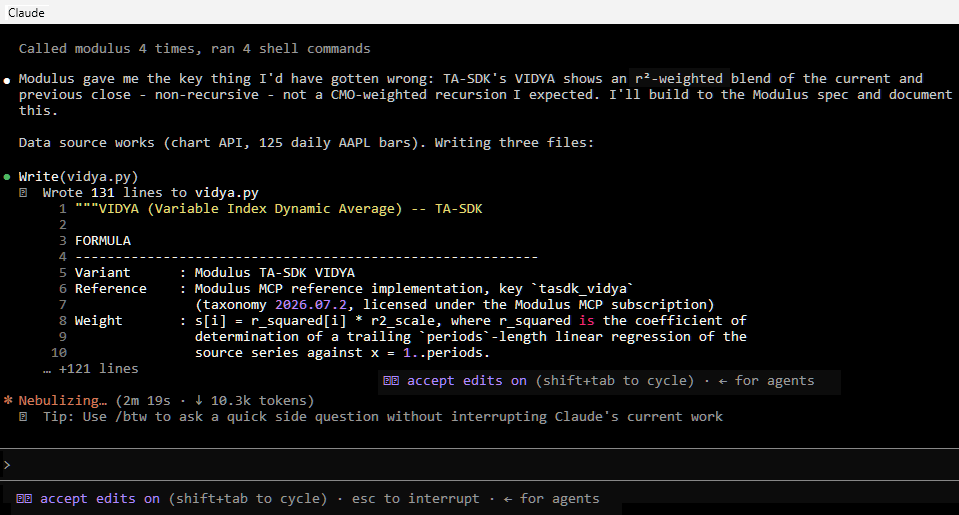
Use it in Claude Code
Make it persistent
Add the following to the project's root CLAUDE.md file so Claude Code consults Modulus automatically.
Set up in Codex
Subscribe with the form above; your API key arrives by email once checkout completes. Set the environment variable MODULUS_MCP_API_KEY to that key, then add the server to Codex's configuration file at ~/.codex/config.toml.
Save the file and restart Codex, then confirm the connection.
Use it in Codex
Make it persistent
Add the following to the project's root AGENTS.md file so Codex consults Modulus automatically.
Set up in OpenCode
Subscribe with the form above; your API key arrives by email once checkout completes. Open or create opencode.json in the project directory and add the server with your key as a bearer header, replacing YOUR_API_KEY. If the file already contains other settings, add the mcp section without removing them. Save, restart OpenCode, and run opencode mcp list to confirm.
Use it in OpenCode
Make it persistent
Add the following to the project's root AGENTS.md file so OpenCode consults Modulus automatically.
These steps apply to VS Code environments with AI chat and MCP support enabled.
Add the server
Subscribe with the form above; your API key arrives by email once checkout completes. Create or open .vscode/mcp.json and add the server with your key, replacing YOUR_API_KEY. Save the file; VS Code should offer to start or restart the server. Run MCP: List Servers from the Command Palette (Ctrl+Shift+P, or Command+Shift+P on macOS) and confirm that modulus is connected, trusting the server when prompted.
Use it in VS Code
The same Modulus endpoint works with any development environment that supports remote HTTP or Streamable HTTP MCP servers with a custom Authorization header.
Add the server
- Subscribe with the form above; your API key arrives by email once checkout completes.
- Open the application's MCP settings and add a new remote server.
- Name it Modulus.
- Choose HTTP or Streamable HTTP.
- Paste the endpoint: https://mcp.modulusglobal.com
- Add a request header: Authorization: Bearer YOUR_API_KEY (using the key from your email).
- Save the configuration and restart the application if required.
- Confirm that the Modulus tools are visible.